
Google Keyword Planner is a free keyword research tool provided by Google that helps marketers discover keywords with real search demand. Originally built for advertisers, it has become one of the most trusted tools for search volume keyword research because the data comes directly from Google’s own ecosystem. With the Google Keyword Planner tool, users can find keyword ideas, check average monthly searches, and evaluate commercial intent before creating content or campaigns.
A key advantage of Google Keyword Planner is its close integration with Google Ads, which makes it especially useful for understanding how keywords perform in paid and organic strategies. Unlike third-party tools, keyword research with Google Planner reflects real advertiser behavior and user searches. When used strategically, Google Keyword Planner helps identify profitable keywords that drive targeted traffic and long-term SEO growth.
How to Access the Google Keyword Planner Tool?
To start using Google Keyword Planner, you need an active Google Ads account. The good news is that the Google Keyword Planner tool is completely free, and you don’t need to run paid ads to access it. Simply create a Google Ads account, complete the basic setup, and pause the campaign if you don’t plan to advertise.
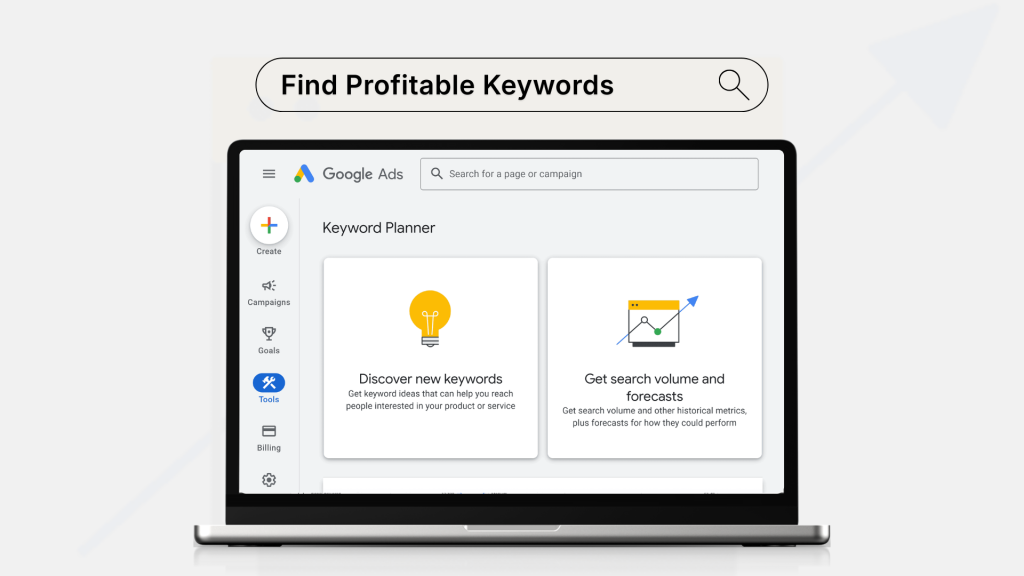
Once logged in, click the “Tools & Settings” menu and select Google Keyword Planner from the Planning section. From here, you’ll see two main options: “Discover new keywords” and “Get search volume and forecasts.” Both are essential for keyword research with Google Planner. Because the data comes directly from Google, it provides reliable insights for search volume keyword research. Accessing Google Keyword Planner correctly ensures you start your SEO strategy with accurate, trustworthy data.
Finding New Keywords with Google Keyword Planner
Google Keyword Planner makes discovering fresh keyword ideas simple through the “Discover new keywords” feature. By entering seed terms related to your business, products, or services, the Google Keyword Planner tool generates hundreds of relevant suggestions based on real user searches. This is especially helpful for beginners who want reliable search volume keyword research without relying on guesswork.
Another effective option is starting with a website URL. By analyzing a competitor page or your own site, keyword research with Google Planner reveals keyword themes that Google already associates with that content. Each suggestion includes average monthly searches, competition level, and bid estimates from Google Ads. Because the data comes directly from Google, Google Keyword Planner helps identify profitable keywords that align with real search intent and business goals.
Understanding Search Volume and Competition Data
Google Keyword Planner provides essential metrics that help evaluate keyword potential before targeting them. The most important metric is average monthly searches, which shows how often users search for a term over time. This makes search volume keyword research more realistic, as the numbers are based on real activity inside Google rather than estimates from third-party sources.
Another key metric inside the Google Keyword Planner tool is competition. It’s important to understand that this competition level reflects advertiser demand in Google Ads, not organic SEO difficulty. High competition often signals strong commercial intent, while lower competition may present easier opportunities. When combined with top-of-page bid data, keyword research with Google Planner helps identify keywords that balance traffic potential and profitability. Interpreting these metrics correctly allows Google Keyword Planner users to select keywords that support both SEO and conversion-focused strategies.
Filtering and Refining Keywords for Profitability
Google Keyword Planner includes powerful filtering options that help narrow large keyword lists into profitable targets. Using the “Refine keywords” and “Add filter” features, the Google Keyword Planner tool allows users to filter by average monthly searches, competition level, and top-of-page bid ranges. This is essential for search volume keyword research, as it removes low-value or irrelevant terms from your list.
One effective strategy in keyword research with Google Planner is filtering by bid value. Higher bid ranges usually indicate strong buyer intent, making those keywords more profitable for content and campaigns. Location and language filters also help target specific markets accurately. Because all data comes directly from Google, these filters reflect real advertiser behavior inside Google Ads. When used correctly, Google Keyword Planner turns broad keyword ideas into focused opportunities that drive qualified traffic and revenue.
Using Google Keyword Planner for SEO Strategy
Google Keyword Planner is not just for ads; it’s highly effective for building a solid SEO strategy. By focusing on medium-volume keywords with clear intent, the Google Keyword Planner tool helps prioritize topics that users actively search for. This approach makes search volume keyword research more strategic, ensuring content targets demand rather than assumptions.
A smart SEO tactic with keyword research with Google Planner is grouping related keywords into topic clusters. These clusters support internal linking and topical authority, which aligns well with how Google evaluates relevance. You can also map keywords to different funnel stages, informational for blogs and commercial for landing pages. While competition metrics come from Google Ads, they still reveal monetization potential. Used consistently, Google Keyword Planner guides content planning, improves rankings, and attracts qualified organic traffic.
Google Ads Keyword Planner vs SEO Tools
Google Keyword Planner is often compared with third-party SEO tools, but its biggest strength is data authenticity. Because it pulls information directly from Google Ads, the Google Keyword Planner tool reflects real advertiser behavior and search trends. This makes search volume keyword research more reliable than estimates provided by external databases.
However, unlike advanced SEO platforms, keyword research with Google Planner has limitations. It shows volume ranges instead of exact numbers and lacks organic difficulty metrics. Tools like Ahrefs or Semrush offer deeper competitor insights, backlink data, and ranking difficulty scores. That said, Google Keyword Planner remains unmatched for understanding commercial intent and baseline demand straight from Google. For best results, many SEOs combine Google Keyword Planner with other tools to balance accuracy and depth.
Common Mistakes to Avoid in Google Keyword Planner
Google Keyword Planner is powerful, but many users make mistakes that limit its effectiveness. One common error is relying only on high-volume keywords. While these terms look attractive, they are often highly competitive and harder to convert. Effective search volume keyword research requires balancing volume with intent, not chasing numbers alone.
Another mistake is misunderstanding the competition metric inside the Google Keyword Planner tool. This value reflects advertiser competition in Google Ads, not organic SEO difficulty. Ignoring location, language, and date range settings is also a frequent issue that leads to inaccurate results. When doing keyword research with Google Planner, users should always refine targeting to match their audience. Lastly, failing to group keywords into themes weakens SEO impact. Used correctly, Google Keyword Planner delivers reliable insights directly from Google, but only when these mistakes are avoided.
Final Thoughts
Google Keyword Planner remains one of the most reliable tools for finding profitable keywords because its data comes straight from Google. Whether you are planning SEO content or paid campaigns, the Google Keyword Planner tool provides trustworthy insights into search demand, trends, and commercial intent. This makes search volume keyword research more accurate than relying solely on third-party estimates.
While keyword research with Google Planner has limitations, such as volume ranges instead of exact numbers, it excels at revealing how real users search and how advertisers value keywords inside Google Ads. When combined with smart filtering and strategic analysis, Google Keyword Planner helps build content that attracts qualified traffic and converts. For long-term SEO success, using Google Keyword Planner as a foundational research tool is a practical and data-driven approach.


